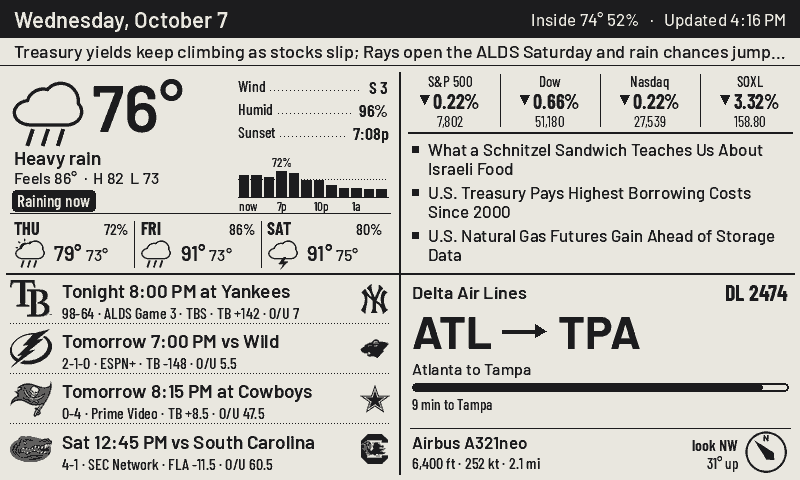
Quad Board
Four corners of your day on a 7.5-inch e-paper screen: the weather, the news and markets, your teams, and whatever is flying over the house right now. It runs on its own battery and only repaints the corner that changed.
- Panel
- 7.5″ 800×480, 4 grey levels
- Board
- Seeed reTerminal E1001, ESP32-S3
- Refresh
- ~1 s partial per corner, 3.5 s full
- Data
- all keyless public APIs
One glance, four answers
Weather
Current conditions, a rain-chance strip for the next few hours and three days ahead.
- 15-minute rain nowcast: “Raining now”, “70% rain by 7p”
- NWS severe alerts take over the message strip
News & markets
Index moves plus any tickers you pick, over headlines that rotate on every update.
- WSJ section feeds: world, US, markets, tech
- One Yahoo call covers every ticker
Your teams
Live score, last result or next game for every team you follow, with TV and the line.
- Any ESPN team: NFL, NBA, NHL, MLB, college
- Refreshes every 3 minutes while a game is on
The plane overhead
Airline, route, aircraft, altitude and which way to look, from live ADS-B.
- Ranked by how high it sits in your sky, not raw distance
- Counts every flight that passed today
Above the quad, a strip carries one line: your own pinned message, a severe weather alert, or a sentence from Claude that ties the day together. When the Space Station is about to pass or a rocket is going up within sight, it takes over the plane corner with a countdown and a compass.
Press a button for more
Each corner opens into a full screen of its own. Detail pages fall back to the quad after a few minutes, so the board never gets stuck on one. Click any of these to send it to the device above.
The screen is dumb on purpose
A small Python server draws every pixel. The firmware only fetches rectangles and decides how to refresh them, so changing the layout, the cadence or a data source never means reflashing the board.
Render
The server composes the full 800×480 frame with Pillow, using the same fonts and icons you see here.
Diff
It compares against what is on the glass and keeps only the rectangles that changed.
Long-poll
The board holds an HTTPS request open. On battery it deep-sleeps between checks instead.
Play the reel
Changed corners get a ~1 s partial refresh. Every couple of hours a full flash wipes ghosting.
| What | How often | Refresh |
|---|---|---|
| Every corner | 10 min | Full, 4 grey levels, anti-aliased text |
| Plane overhead | as set | Partial, no flash |
| Live scores | 3 min | Partial, only while a game is on |
| Ghosting wipe | 120 min | One flashing full refresh |
| Quiet hours | e.g. 23–6 | No scheduled updates overnight |
All of these are knobs on a small web dashboard the server hosts, along with location, feeds, tickers, teams and the corner order.
No API keys
claude CLIAn afternoon, one board
Hardware
- Seeed reTerminal E10017.5″ mono, ESP32-S3
- USB-C cablefor flashing
- Any always-on box for the serverVPS, Pi, NAS
The screen: Seeed reTerminal E1001 — 7.5″ 800×480 mono e-paper with an ESP32-S3 and a battery, the one board this whole project is built around.
Get it on AmazonThe server needs to be reachable over HTTPS from the board, so put it behind nginx or Caddy on a domain you own. Running locally works for previews: python cases.py renders every screen to PNG without any hardware.
Server
# Python 3.10+
cd server
pip install -r requirements.txt
cp quad.env.example quad.env  # set tokens
set -a; . ./quad.env; set +a
python app.py
# settings: http://127.0.0.1:8740/?k=$QUAD_ADMIN
Firmware
cd firmware
cp src/secrets.example.h src/secrets.h  # host + token
pio run -t upload --upload-port COM9
First boot opens a Wi-Fi setup portal named QuadBoard-XXXX. Join it from your phone and pick your network.